How Do Restaurants Make Their Online Menus Easier to Access?
Customers often check a restaurant’s menu online before deciding where to eat. However, slow-loading pages, blurry images, and hard-to-read PDFs can make this simple task frustrating. Restaurants can make their online menus easier to access by improving loading speed, using mobile-friendly designs, and keeping menu information clear and updated. These improvements help customers explore food options, check prices, and plan their visits without unnecessary effort.
Why Is Online Menu Accessibility Important for Restaurants?
An online menu often shapes a customer’s first impression of a restaurant. People want to explore food choices, compare prices, and check opening hours before leaving home. If a menu takes too long to load or requires several steps to open, visitors may look elsewhere. A simple, well-organized menu helps customers find what they need without wasting time.
Accessibility also matters because customers use different devices and internet connections. Some browse on older phones, while others rely on mobile data or assistive technology. Restaurants can improve the experience by keeping menu pages lightweight and easy to navigate. For example, using an image compressor can reduce the file size of food photos while maintaining suitable visual quality. Smaller images often load faster and make menus more convenient for mobile users.
A restaurant’s online menu should also provide helpful details beyond food names. Prices, portion options, ingredients, and available services help customers make informed decisions. When restaurants present this information clearly, they reduce confusion and create a more welcoming experience.
Key Takeaway: Accessible online menus help customers find food choices, prices, and restaurant details quickly across different devices.
How Can Restaurants Make Online Menus Load Faster?
Website speed affects how easily customers can explore a digital menu. Large images, unnecessary animations, and poorly optimized files can slow down a page. This becomes especially noticeable when customers browse through mobile networks with limited bandwidth.
Restaurants can improve menu loading speed by using smaller image files and removing unnecessary elements. For instance, a restaurant that uploads several large food photos may experience slower loading times than one that uses properly sized images. An image compressor helps reduce image file sizes, making photos easier to load without removing them from the menu.
Modern image formats such as WebP and AVIF can also help restaurants reduce file sizes. However, they should choose formats that work well with their website and maintain clear images. Google provides useful guidance on optimizing website images to improve loading performance.
Restaurants should also test their menu pages on smartphones, particularly using mobile connections. A page that loads quickly on a desktop computer may still feel slow on a phone.
Key Takeaway: Restaurants can improve menu loading speed by reducing image sizes, choosing efficient file formats, and avoiding unnecessary page elements.
What Makes an Online Restaurant Menu Mobile-Friendly?
Many customers browse restaurant websites while traveling, working, or planning meals away from home. As a result, digital menus should work smoothly on smaller screens. A mobile-friendly menu adjusts to different screen sizes without making users zoom in or scroll sideways.
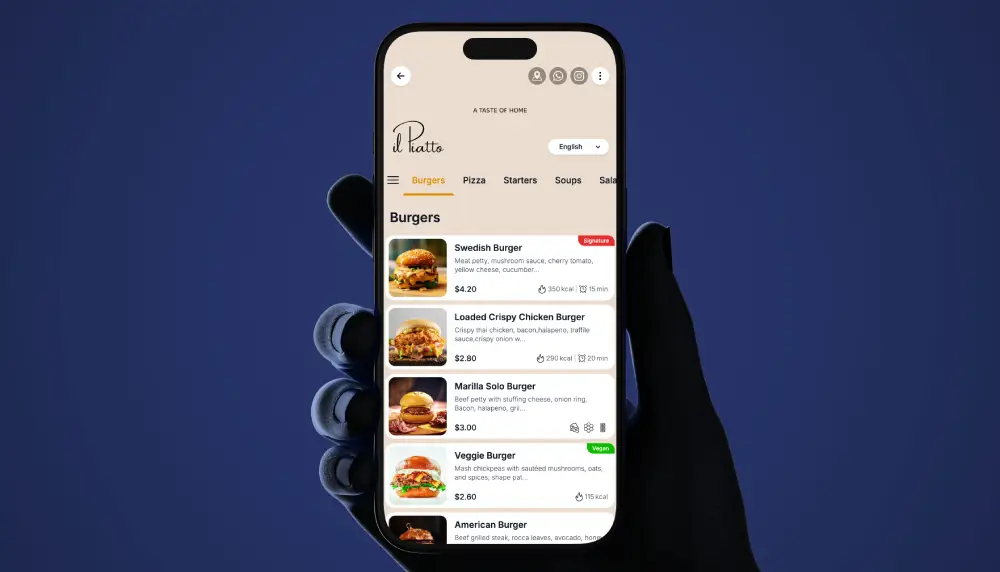
Restaurants can achieve this through responsive web design. Responsive design means that a website automatically adjusts its layout to match the screen being used. For example, a desktop menu may display several food categories side by side, while the mobile version arranges them vertically.
Text should remain large enough to read comfortably, and buttons should have enough space between them to prevent accidental taps. Food categories such as appetizers, main dishes, desserts, and drinks should be clearly labeled.
Restaurants should also avoid using images as the only way to display menu information. A photograph of a printed menu may look attractive, but customers can struggle to read small text. Regular webpage text allows visitors to zoom, search, and use screen readers more easily.
Key Takeaway: A mobile-friendly menu uses responsive layouts, readable text, simple navigation, and properly sized buttons to improve access on smartphones.
How Can Restaurants Improve Menu Readability and Accessibility?
A readable menu helps customers understand food choices without unnecessary effort. Restaurants should use clear fonts, suitable text sizes, and enough contrast between the text and background. Decorative fonts may look appealing, but they can make descriptions difficult to understand.
Accessibility also means supporting people with visual, motor, or other disabilities. Restaurants should use meaningful headings, descriptive links, keyboard-friendly navigation, and text descriptions for important images. The Web Content Accessibility Guidelines from W3C provide recognized recommendations for making websites easier to use.
Another useful improvement involves presenting dietary and ingredient information clearly. Customers may look for vegetarian meals, dairy-free options, or information about common allergens. Restaurants should provide accurate details and avoid making unsupported claims about whether a dish is safe for someone with an allergy.
For example, instead of showing only “Special Pasta,” a restaurant could include the main ingredients, serving size, and price. Clear descriptions help customers understand the menu before ordering.
Key Takeaway: Restaurants improve menu accessibility through readable fonts, strong contrast, descriptive food information, and support for assistive technology.
Why Should Restaurants Avoid Using Only PDF Menus?
PDF menus are common because restaurants can upload existing printed designs to their websites. However, PDFs can create problems when they contain small text, large images, or layouts designed for paper rather than phones.
Customers may need to download a file before reading it. Some PDFs also require repeated zooming and horizontal scrolling. Image-only PDFs can create additional barriers because screen readers may not recognize the text unless the document has appropriate accessibility features.
A better approach is to display the main menu directly on a webpage. Restaurants can still offer a downloadable PDF for visitors who prefer printing or saving a copy.
HTML menus offer practical benefits because customers can search for dishes, move between categories, and view descriptions without opening another file. Restaurants can also update individual prices or items without replacing an entire document.
For example, a café that changes its breakfast selection regularly can edit the online menu directly instead of uploading a new PDF every week.
Key Takeaway: Webpage-based menus are often more convenient than PDF-only menus because they support easier navigation, searching, and mobile reading.
How Can Restaurants Help Customers Find Their Menus Online?
An accessible menu should also be easy to discover. Customers should not have to search through several website pages to find food options or prices. Restaurants can solve this problem by placing a clearly labeled “Menu” link in their main navigation.
The homepage should also offer a direct path to the menu. Restaurants with separate breakfast, lunch, and dinner selections can organize these under clear categories. This makes navigation easier for customers who already know what they want.
Restaurant information websites such as Everyday Hours can also be relevant when people research dining options, operating hours, and local businesses. Restaurants should make sure the business details they publish across their own websites and relevant listings remain accurate and consistent.
Search visibility matters as well. Descriptive page titles, headings, and useful food descriptions help search engines understand the content. A page titled “Dinner Menu” with clearly organized dishes gives readers more useful information than an unnamed image file.
Restaurants should also check that menu links work properly on their official websites and any third-party profiles they maintain.
Key Takeaway: Restaurants make menus easier to discover by adding visible navigation links, organizing food categories, and keeping website and business listing information consistent.
How Often Should Restaurants Update Their Online Menus?
An outdated menu can create confusion and disappointment. Customers may choose a restaurant because of a particular dish, only to discover that it is no longer available. Incorrect prices can also create uncomfortable situations during ordering.
Restaurants should review their online menus whenever dishes, prices, ingredients, or availability change. Seasonal restaurants may need frequent updates, while businesses with stable menus may require fewer changes. The goal is to keep online details consistent with what customers can actually order.
For example, a restaurant introducing a weekend brunch menu should clearly explain when those dishes are available. Similarly, limited-time promotions should include accurate dates to prevent customers from expecting expired offers.
It also helps to assign menu maintenance to a specific staff member or manager. Clear responsibility reduces the chance of forgotten updates or broken links. Restaurants can perform a brief monthly review even when no major changes are planned.
Displaying a last-updated date may also help customers understand how current the information is, provided the date reflects a real review.
Key Takeaway: Regular menu updates help restaurants maintain accurate prices, food availability, ingredient details, and customer expectations.
What Practical Steps Can Restaurants Take to Improve Digital Menus?
Restaurants do not need a complicated website redesign to make their menus easier to access. Small improvements can make a meaningful difference, particularly when they address common problems such as slow loading, confusing navigation, and unreadable text.
A practical approach starts with testing the existing menu as a customer would. Open it on a phone, switch to a slower connection, and try finding a specific dish. This simple exercise often reveals issues that restaurant owners may overlook when viewing their websites on desktop computers.
Restaurants can follow this checklist:
- Test mobile usability: Check whether menu text, categories, and prices display correctly on smartphones.
- Optimize food photos: Resize images and reduce unnecessary file sizes before uploading.
- Use clear category headings: Separate appetizers, main meals, desserts, and drinks.
- Provide readable text: Avoid showing essential information only inside pictures.
- Keep prices updated: Make sure website information matches the current restaurant menu.
- Add useful food descriptions: Include ingredients, portion options, and relevant dietary details.
- Check menu links: Confirm that customers can open the menu from the homepage and business profiles.
- Test accessibility: Review keyboard navigation, screen-reader compatibility, and text contrast.
Restaurant managers should also ask staff members or regular customers to test menu pages. Their feedback can identify confusing wording, missing details, or navigation problems that technical checks may miss.
Key Takeaway: Restaurants can improve digital menu access through routine testing, image optimization, clear descriptions, updated information, and simple navigation.
Frequently Asked Questions
1. How can restaurants make online menus easier to access on mobile devices?
Restaurants should use responsive website layouts, readable fonts, fast-loading images, and simple category navigation. Menus should display properly without forcing customers to zoom or scroll sideways.
Quick Answer: Responsive design and clear navigation make online menus more accessible on smartphones.
2. Does compressing food images improve menu loading speed?
Yes. Reducing image file sizes can help menu pages load faster, especially on slower mobile connections. Restaurants should balance compression with visual quality so food photographs remain clear.
Quick Answer: Smaller, well-optimized images can improve menu loading speed while preserving useful visual detail.
3. Are PDF menus suitable for restaurant websites?
PDF menus can serve as downloadable alternatives, but they should not be the only format. A well-structured webpage is often easier to read, search, and navigate on mobile devices.
Quick Answer: Restaurants should prioritize accessible webpage menus and offer PDFs as an optional format.
4. What information should an accessible restaurant menu include?
A useful menu should include food names, prices, descriptions, ingredient details, and relevant dietary information. It should also explain special availability or serving times where needed.
Quick Answer: Clear prices, food descriptions, and accurate ingredient information help customers make informed choices.
5. How frequently should restaurants check their online menus?
Restaurants should update menus whenever prices, dishes, ingredients, or availability change. They should also check links and formatting regularly to ensure customers can access accurate information.
Quick Answer: Menu updates should follow actual restaurant changes, supported by regular accuracy checks.
Conclusion
Restaurants can make their online menus easier to access by focusing on speed, readability, mobile compatibility, and accurate information. Customers should be able to explore dishes, check prices, and understand food options without dealing with large downloads or confusing website layouts.
Simple changes, such as reducing image sizes, providing text-based menus, improving navigation, and updating food details, can make the browsing experience smoother. These improvements also help search engines understand menu content and give customers more useful information when researching dining options.
Ultimately, an effective online menu should do more than display food. It should make the entire process of choosing a restaurant simpler, clearer, and more convenient.
Final Takeaway: A fast, accessible, and regularly updated restaurant menu improves the customer experience, supports online discoverability, and helps people find reliable dining information with less effort.